Improve your tracking with PostHog: A practical guide to reliable data
2026-11-17

You want to know where people drop out of your checkout, which features they use or whether a new interface works better. To answer those questions, you need data you can trust. Unclear events, purchases counted twice and changing definitions make every analysis harder.
AI makes this foundation even more important. An agent can help prepare analyses and answer questions about your product. How useful its answers are also depends on what the data actually represents. A well-written prompt cannot fix an incorrectly measured conversion.
At pargoo, we use PostHog in many projects for tracking and product analytics: understanding how people use a product. This guide walks you through improving your tracking step by step. We will use a checkout as our example throughout: select a product, add it to the cart, enter personal details and pay.
1. Start with the decision you want to make
Begin with a specific question: at which step are we losing potential buyers? That determines which events you need and what counts as success.
For our example checkout, we define a successfully completed and confirmed purchase as the conversion. Clicking “Pay” is not enough. The payment could still fail or be abandoned afterwards.
Also define how you will calculate conversion. Are you comparing purchases with everyone who viewed a product or only with people who started checkout? Does the purchase need to happen in the same session or within a longer time window? These choices are part of the analysis definition.
A useful starting point has three elements: the question, the target event and the path leading to it. You can then check whether your tracking provides the information you need.
2. Build a stable event foundation you can extend
An event is a record of something that happened in your application. An initial tracking plan for our checkout might look like this:
product_selected: A product was selected.product_added_to_cart: The product was successfully added to the cart.checkout_started: Checkout began.checkout_details_completed: The required details were successfully accepted.purchase_completed: The backend confirmed the purchase according to the agreed conversion definition.
These names are examples. What matters is that your team understands each event's meaning and exactly when it fires. For example, the event for completed details measures successful completion of that step. It does not need to include the personal information entered into the form.
Add properties you will use for comparisons, such as the product ID, platform (web or mobile), purchase amount and currency. Define what these properties mean and how they are formatted. Amounts recorded in major and minor currency units must not end up under the same ambiguous definition.
For each core event, document its meaning, trigger, required properties and who is responsible for it. That makes the plan understandable to new team members and easier to extend later.
You can then add detail over time: a failed payment step, a new payment method or an experiment variant, for example. Existing core events retain their meaning. If that meaning changes substantially, document the change and account for it when comparing periods.
Define product actions independently of button text
A tracking rule might depend on a button being labelled “Buy now”. If the label changes to “Continue to payment”, that rule may stop matching. The product still works, but the measurement suggests that behaviour has changed.
An explicitly implemented event such as checkout_started fires at the relevant action, independently of the visible label. PostHog supports these explicit events alongside automatic interaction capture.
This is an implementation choice. Google Tag Manager can also process defined events through a data layer. A clear event definition and a correct implementation matter more than choosing between two delivery mechanisms.
Check core events by running through real test journeys. Does the expected event arrive at the correct step? Are its properties accurate? Does reloading a page accidentally count a purchase again? Repeat these checks when the application changes.
3. Combine browser and backend events where they make sense
Selecting a product or starting a form step happens in the interface. Confirmation of a purchase often comes from the backend or a response from the payment system.
Capture important business outcomes where they are confirmed. A purchase event sent from your application server to PostHog does not depend on the browser subsequently loading a confirmation page. PostHog provides server-side SDKs and an event API for this.
Plan identity mapping as part of the setup. Browser and backend events need matching identifiers to form a connected journey. For anonymous visits, this can be a visitor ID passed consistently between systems. After login, you can link activity to a stable internal user ID. PostHog documents how identification and merging work.
You also need a way to prevent duplicate business events, for example when a purchase confirmation is processed again. A user identifier and a purchase-event identifier serve different purposes.
Server-side tracking makes backend events more resilient to browser blockers. A click that happens only in the browser and is never sent remains invisible, however. Backend delivery also needs to work and be checked. Plan the scope of collected data and consent for collection and onward sharing as part of the setup.
4. Create a shared data foundation
If your product, campaigns and AI agent use different definitions of a “purchase”, their conclusions will conflict. A central platform makes shared analysis easier. Your team still needs to agree on and maintain consistent definitions.
Alongside product events, PostHog can import other sources, such as Google Search Console. Data from Google Ads and Meta Ads can also be connected. Check which tables, periods and relationships your question requires. Imported campaign figures are not automatically linked to individual product users.
In the other direction, you can send selected conversion events to other systems, for example through the Meta Ads destination. Define which events and properties are needed and check delivery. Reliable conversion signals can support campaign optimisation.
A shared data foundation does not mean Google, Meta and your product analytics will show identical figures everywhere. Your internal visitor ID does not replace each advertising platform's own matching process. The goal is a traceable foundation that helps you understand and explain differences.
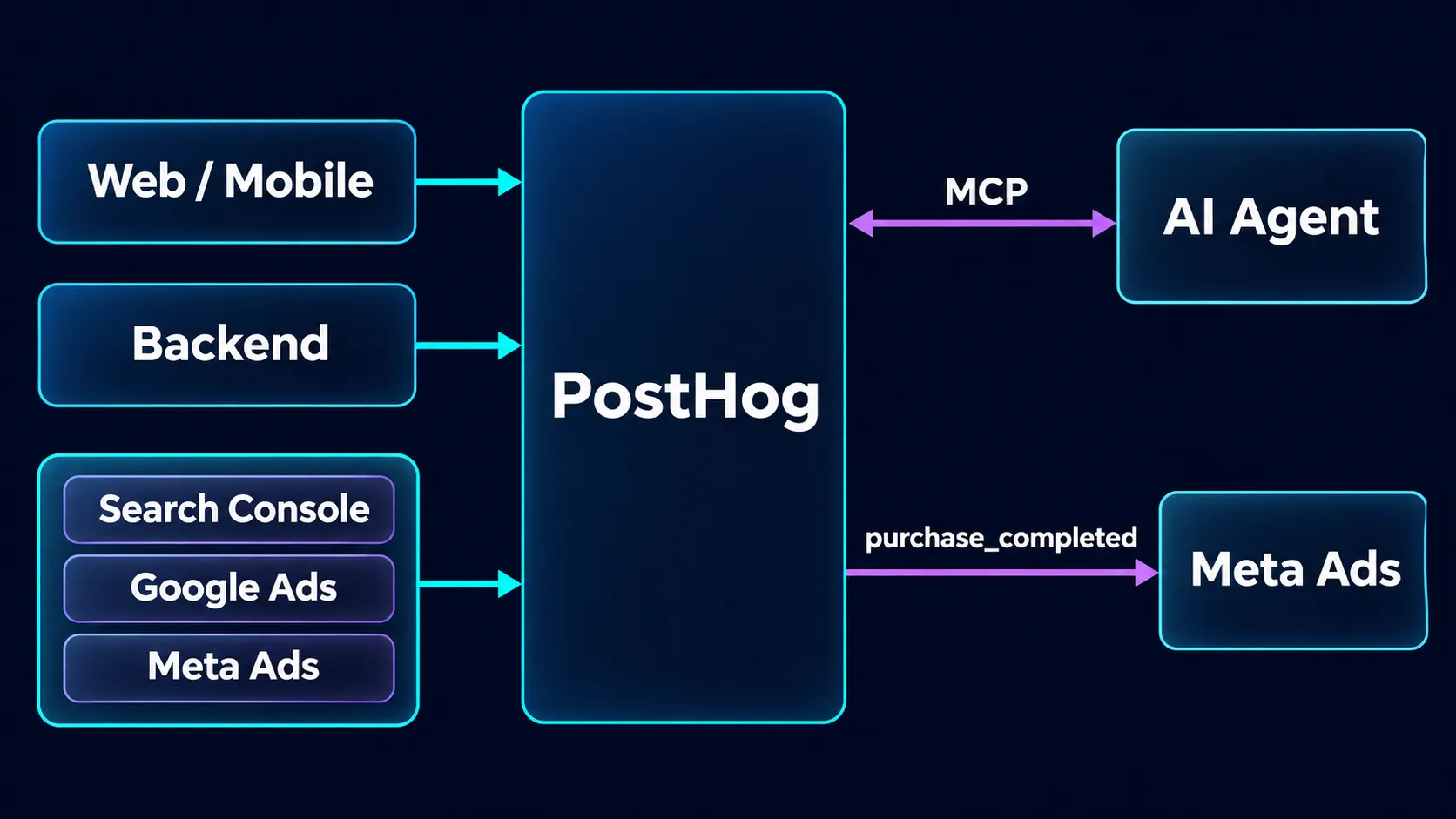
A shared event foundation connects product analytics, data imports, selected conversion destinations and agent workflows through PostHog.
5. Read the checkout as a funnel
A funnel shows how many users reach the defined steps in the chosen order and within the specified time window. Our example runs from product selection through the cart and checkout to a confirmed purchase.
If many people start checkout but do not complete their personal details, you have a specific area to investigate. Compare web and mobile, for example, where your data volume supports a meaningful comparison.
Check the measurement first. Is an event missing in one app version? Does it fire too early? Has the meaning of a step changed? Reliable measurement is the foundation for assessing user behaviour.
The funnel shows the drop-off point, but it does not automatically explain the cause. A long form, an unclear error message or a technical problem are possible explanations. They start as hypotheses that you need to investigate in the actual journey.
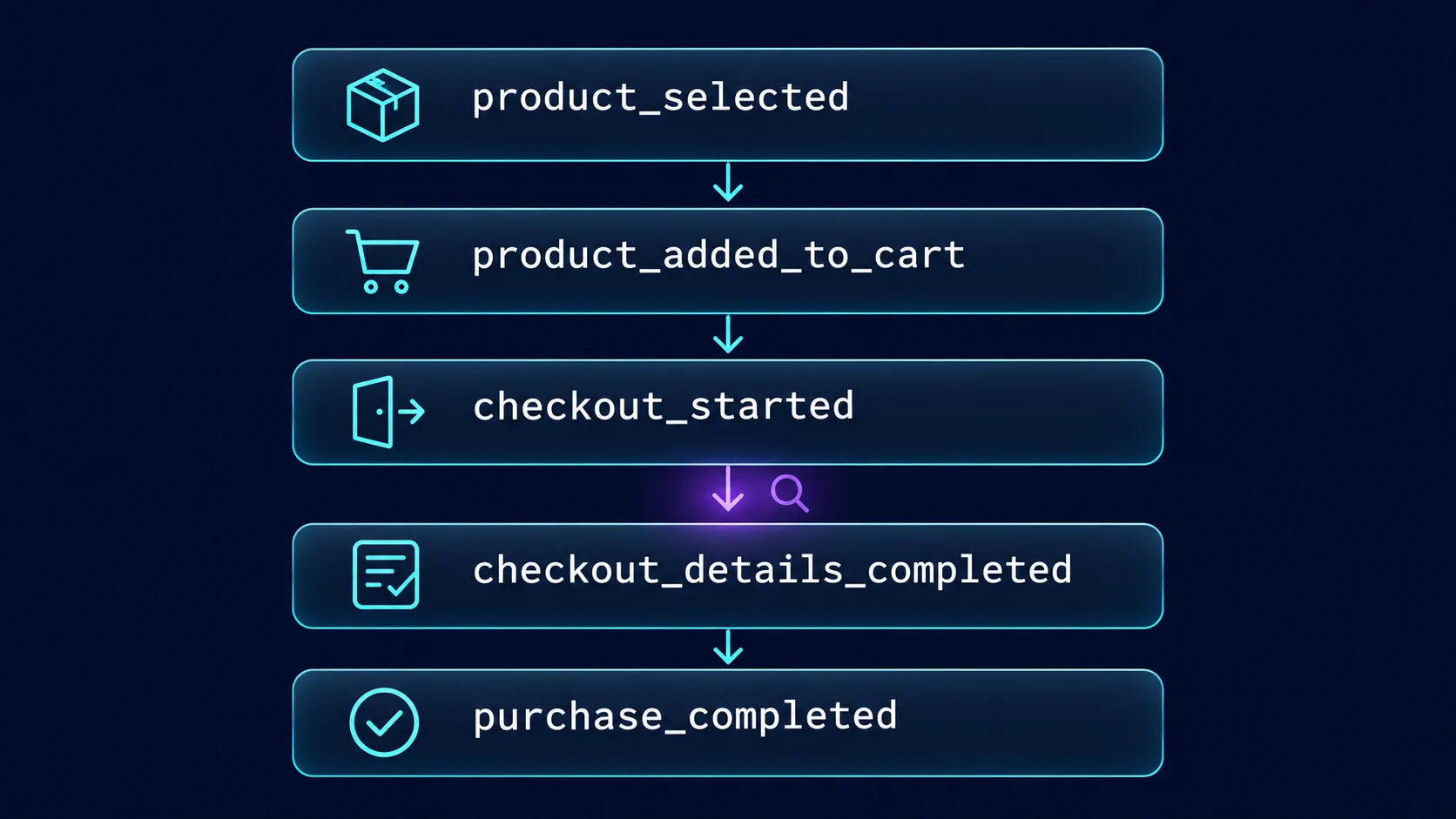
An example checkout journey through to a confirmed purchase. Investigate one transition before making a targeted change.
6. Improve one step and measure the effect
Choose a specific step and state a testable hypothesis. In our example, it might be that a clearer error message helps users complete their details.
Focus the change on that point. If you change the form, prices and payment methods at the same time, it becomes difficult to assess each change's contribution.
With a suitable data volume, you can compare the existing UX with a new variant in an A/B test. Decide in advance which users will participate, which metric you will assess and how long the test is likely to need. PostHog supports planning experiment duration and sample size.
A larger project does not automatically have enough traffic for every test. Relevant factors include traffic through the affected step and the size of the effect you want to detect. A brief movement in the numbers is not enough to establish a reliable winner.
Keep an eye on completed purchases as well as the step you are improving. More completed forms are of little benefit if fewer people then pay successfully. Without an A/B test, a before-and-after comparison can offer clues, but other changes during the period may influence the result.
7. Make the same foundation available to your AI agent
Through the PostHog MCP server, a connected agent can query trends and funnels, among other things. You could ask where checkout conversion has changed or how a journey differs between web and mobile.
The agent needs the same definitions as your team. Which events make up the funnel? What counts as a purchase? Which period and user group are relevant? Make those definitions accessible and ask to see the query and data behind a conclusion.
The agent can support analysis. Whether a difference comes from a product change, a measurement error or different user behaviour still needs to be checked. Access permissions determine which data and capabilities the connection provides.
Why we often choose PostHog
For us, the combination of product analytics, experiments, connected data sources and MCP is an important reason to use PostHog. It lets us expand a tracking plan over time and integrate analysis into our workflows.
We also find its value for money attractive. Product Analytics currently includes one million free events per month, followed by usage-based billing. Other products and features have their own terms. Check your expected usage against the current pricing, rather than assuming a particular period of free use.
Self-hosting is possible too. It comes with responsibilities for operations, updates and scaling, and should not be assumed to offer the same features and support as the cloud service.
Your next step: Check one important journey
Start with a journey such as checkout. Document what counts as a conversion, which core events describe the path and where they fire. Run through it yourself and check the data that actually arrives. Then build out the analysis and plan your first targeted improvement.
At pargoo, we connect tracking plans with technical implementation and UX/UI design. If you want to improve your data foundation as part of your web development, we can work through the questions you want to answer and how your tracking should support them.