Headless CMS: connecting content, AI agents and apps
2026-11-10

An offer needs to appear in your mobile app, a course description on your learning platform and a blog post on your website. The content might come from your editorial team, another business system or a conversation with an AI agent. If you then copy it between tools, you add work and create opportunities for versions to drift apart.
A headless CMS can connect these workflows. It manages content independently of where that content appears. With the right integrations, data can flow in from multiple sources and content can be delivered to websites, web apps and mobile apps. Claude or ChatGPT can also become part of the editorial process through a suitable connection.
Our own blog workflow offers a practical way to explain how this fits together.
One content source, different experiences
A headless CMS separates content management from presentation. It stores elements such as titles, text, images, language versions and categories. Your website or app decides which information it needs and how to display it.
An API, a defined interface between systems, connects the two. Strapi, for example, provides API endpoints for reading and updating content. A mobile app can retrieve published offers while a website displays related articles. Both use the same content foundation, presented in different ways.
With an app built to support this approach, changing a piece of text does not require a new app release. Adding a feature or a new type of layout may still require an app update. The CMS supplies content within the capabilities the application supports.
Content can come from more than one place
The CMS editor is one way to manage content. Other systems can supply data or trigger updates through integrations. For example, product information could come from an inventory system, events from scheduling software or draft articles from an AI-assisted editorial workflow.
These are possible integrations, rather than connections you get automatically. For each source, we establish which data needs to move, how fields map between systems and which system takes precedence if values conflict. We also define what happens when a transfer fails.
Not every type of data needs to live in the CMS. Payment processing, sensitive user information and transactional business workflows can remain in the systems designed to handle them. The CMS manages the content that belongs there and makes it available to the relevant applications.
The result is a clear flow of data with defined responsibilities. It also gives you a foundation for expansion, such as adding a mobile app alongside an existing website.
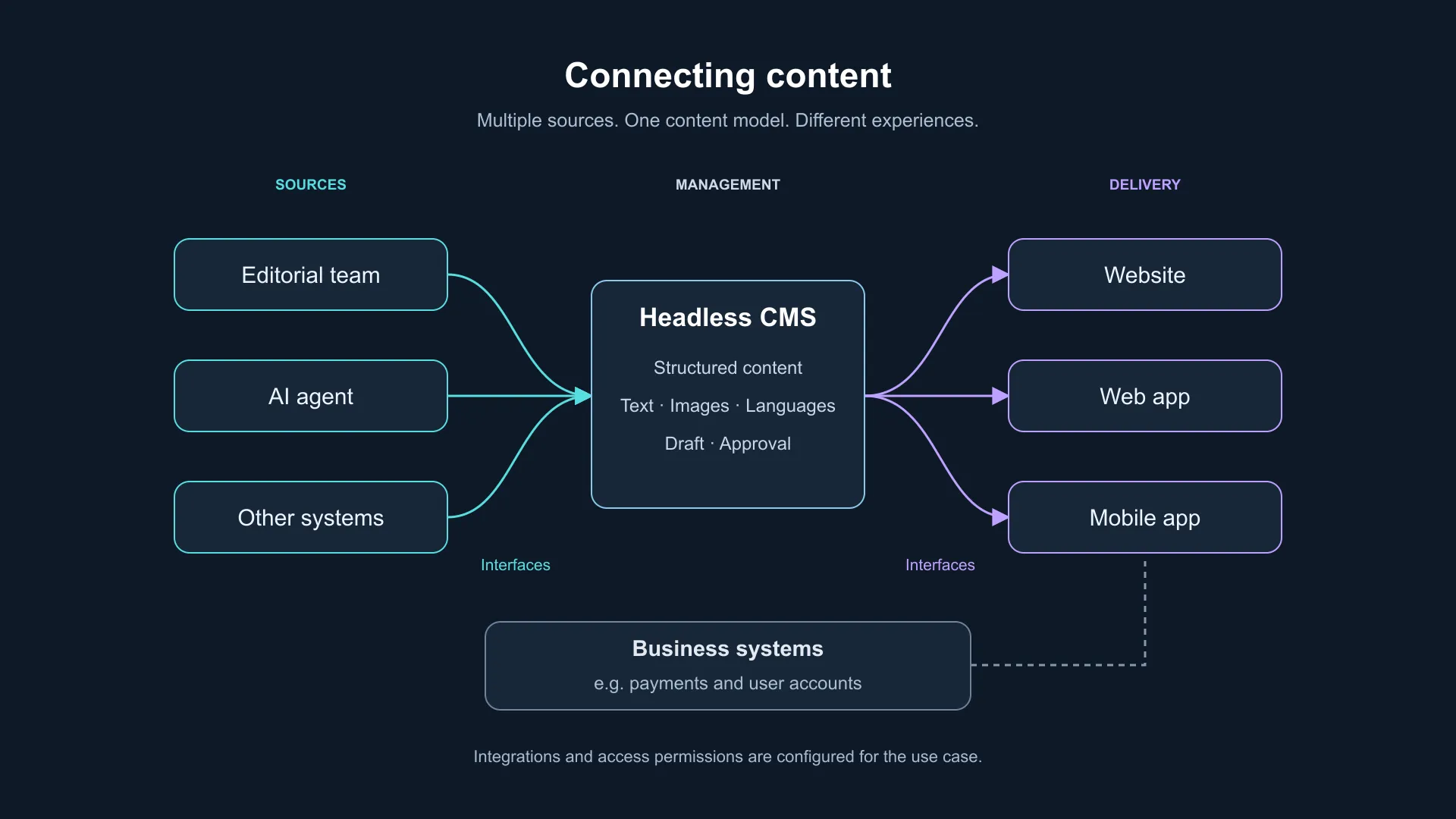
Content from multiple sources reaches the CMS and different applications through configured interfaces. Business systems can remain connected separately.
Our blog workflow: from conversation to CMS
This article began with a conversation. Who are we writing for? What should readers understand afterwards? Which examples will make the explanation useful? Those answers become a brief, followed by a draft.
With an agent connection in place, that draft can be transferred directly into the appropriate CMS fields: title, article body, summary, SEO metadata and language version. You do not have to copy each part out of the chat and assemble it again in the CMS.
At pargoo, we use Strapi for this editorial workflow. An integration gives the agent specific tools, such as reading existing articles or saving a draft. One way to provide those tools is MCP, a protocol that lets AI applications use tools exposed by connected systems. The integration and its permissions determine which actions are available.
Once the content has been approved and published, the website retrieves it from the CMS and displays it. When an update becomes visible also depends on how the website fetches and caches its content.
The benefit is a connected process: discuss, write, review and hand over. The editorial work stays connected to the system where the content will be managed.
A headless CMS for mobile apps: Cashyou
The same principle applies to a mobile product. The app presents the content, while the systems behind it provide the management tools.
The Cashyou platform, which pargoo has helped develop, includes a mobile app, a partner dashboard, and a central backend and CMS. Partners can manage their offers, while the central system supports the management of app content.
This separation matters when designing the architecture. An offer includes editorial information such as its description and image. A cashback feature also needs business logic and connections to payment systems. A CMS and an application backend serve different purposes, even when they work closely together.
The same approach works for a web platform
You do not need a mobile app to benefit from a headless CMS. At ready, Strapi provides the central place to manage courses, lessons and interactive questions for a web-based learning platform. A custom interface presents those materials to learners. Shopify handles checkout and the fulfilment of physical products within the connected sales process.
This shows how specialised systems can work together: learning content in the CMS, presentation in the web platform, and sales functionality in the commerce system.
Cashyou and ready illustrate the content and system architecture. Our own editorial workflow shows how an AI connection can fit into that picture.
What should an AI agent be allowed to do?
That depends on your content and the way you want to work. An agent might prepare new blog posts as drafts. For other content categories, it may make sense to allow updates or publication as well. Sensitive material may need an additional review by a subject specialist.
Those rules should be enforced through the available tools and access permissions. An instruction in a chat does not replace technical access control. The integration should distinguish between reading, editing and publishing content.
A good headless CMS provides an important foundation through structured content and suitable interfaces. Making an agent useful and safe to work with requires the CMS, integration, permissions and editorial rules to work together.
What to clarify before choosing a new solution
Whether your current setup is frustrating or you are starting something new, begin with the way your team actually works:
- Where do content and data originate, and where are they entered more than once?
- Which information should your website, web app and mobile app share?
- What belongs in the CMS, and what should remain in another system?
- Who can read, edit, approve and publish each category of content?
- Which tasks should an AI agent take on, and how will you review its changes?
Your answers shape the architecture. At pargoo, we start with your processes and use them to design the connections between content management, applications and existing systems. If you want to manage content centrally and connect your applications directly, let's discuss your use case.