AI automation without coding experience: Why guardrails matter
2026-11-19

You know a process inside out. You know which information is missing, which steps keep repeating and where time is lost every month. Until now, you may have explained the task to a colleague. Today, you can also work with an AI agent to turn it into an automated workflow.
You do not need to write the code yourself. You need suitable tools and someone who can build the technical foundation with you. Within that setup, you can design and improve workflows. Which data is accessible and which actions are permitted should be clearly defined.
These boundaries are often called guardrails. Implemented well, they help you use AI in everyday work and limit the impact of potential mistakes.
From a custom application to a connected workflow
At pargoo, we once built a small application to support payroll processing, complete with its own interface and backend. It helped with the process, but we still had to copy data into it. At the time, connecting the systems directly would have required more effort than the benefit justified.
Today, we see another way forward. With suitable connections, skills and a plugin, a workflow like this could be much easier to put together. A bundled script could handle recurring tasks. The actual effort still depends on the available interfaces and the permissions required.
This example points to a broader change: with the right tools, people can automate their own processes even without coding experience. They need a suitable technical foundation to build on.
The person doing the work understands the process
A department head does not need to become a plugin developer. They need tools that let them describe their work clearly and adjust the workflow within agreed boundaries.
The starting point is much like handing a task to a colleague. What should the result look like? Which information is needed? What happens when there is an exception? How will you know the result is correct?
Suppose you prepare an internal report every month. You bring data together, check certain figures and add a summary. This is a hypothetical example. Before automating anything, you describe the process and its rules: which sources to use, which calculations apply and who receives the result.
IT cannot supply all that business knowledge for you. It can work with you to decide how to implement each part and where checks are needed.
IT provides the tools and guardrails
The right setup will differ between companies and departments. Your IT team or an external development partner works with you to establish the necessary connections and define what they allow.
One possible component is an MCP server configured for your use case. MCP is a standard through which AI applications can use tools and data made available to them. For your report, a connection might retrieve approved figures and save the result in a designated location.
Three questions need technical answers:
- Which actions are allowed? Reading data, saving a draft and sending something are different permissions.
- Which data is accessible? Access is limited to the files and records actually needed, and must respect the permissions of the person using the system.
- Which rules are mandatory? Business rules are checked where an action is executed, such as in the backend or the connected system.
Building your own MCP server does not automatically enforce these boundaries. What matters is how access and operations are implemented. Any additional script must also operate within the intended permissions.
For the example report, the agent might read figures from an approved source and prepare a summary. Sharing the report with a new group of recipients would be an additional action requiring its own rule or approval.
Instructions describe the workflow. Permissions constrain it.
A skill can document the report's structure, the steps to follow and what a useful result should look like. A plugin can bundle these instructions with other supporting tools. How these components are configured depends on the platform you use.
The instruction “Only use this folder” is not, by itself, a technically enforced access restriction. If the agent can reach other files through another tool, that route remains available. The setup therefore needs to account for the access paths actually provided.
The same applies to central business rules. The person managing the report can change its structure, for example. Whether a record may be read or a result sent is determined by the permissions and checks implemented for those actions. Editing a workflow instruction alone should not expand those permissions.
That creates two distinct responsibilities: the business user shapes the workflow, while IT maintains the environment in which it runs.
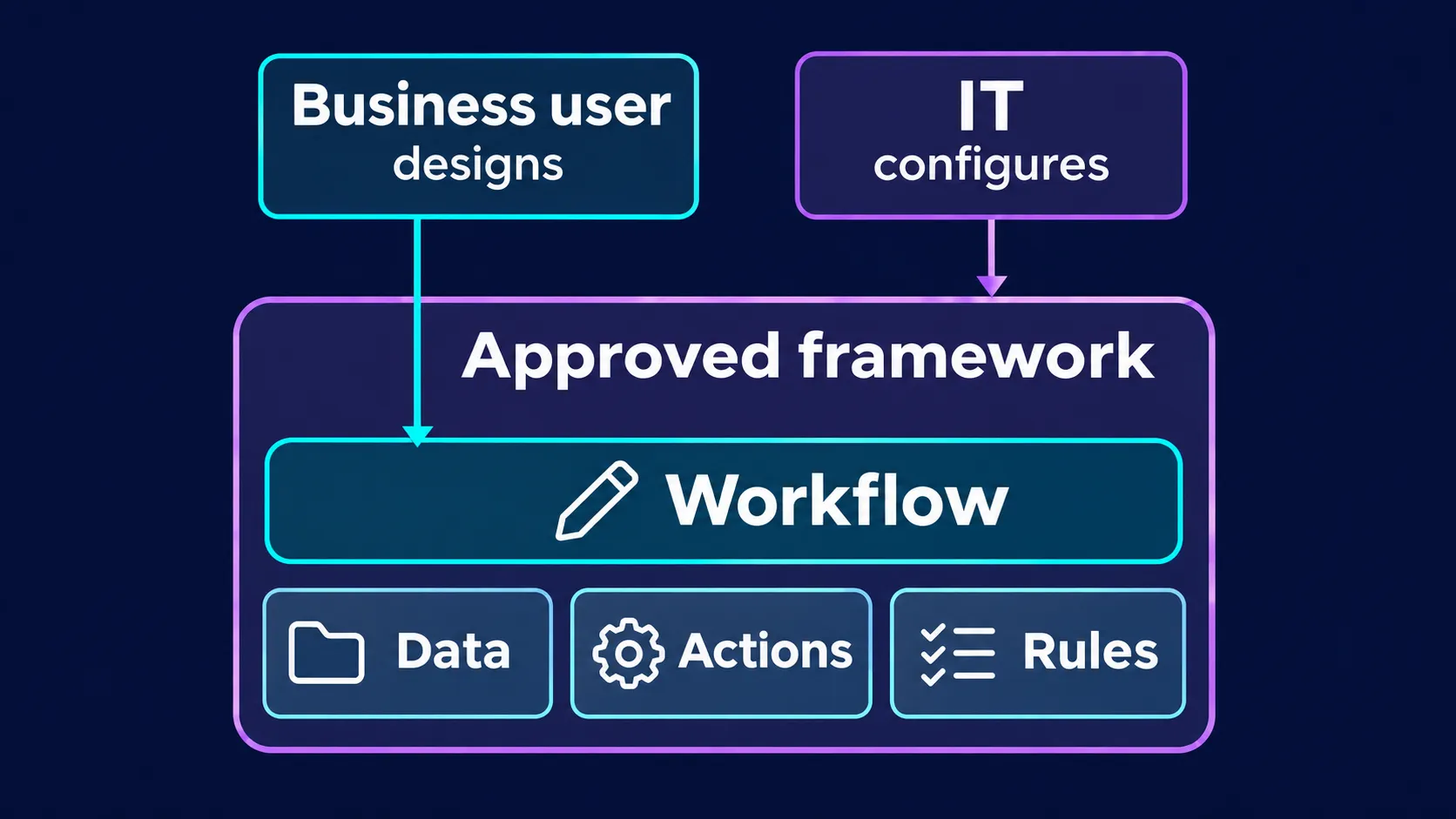
Business users shape workflows using approved tools and data. IT maintains the technical framework and sets up the extensions they need.
AI can make mistakes. Build in checks.
An AI-generated result is not automatically correct. A summary may miss an important exception or misinterpret information. People make mistakes too. In both cases, what matters is how the work is checked and what the consequences of an error could be.
Define what a correct result means for your automation. For the report, you could check that it uses the right period, totals match the source data and missing information is visible. It should also be possible to trace the AI-generated summary back to its underlying data.
Some checks can be implemented as fixed rules. Others require professional judgement. Depending on the task, the workflow might prepare a draft independently, while a person decides before it is shared or a consequential change is made.
Also test cases with missing or conflicting data. A well-designed workflow should stop at that point or flag the gap, rather than quietly continue with an invented assumption. You need to test whether the actual implementation does this.
An agent, a script or a small application?
Using AI to develop a workflow does not mean an AI model needs to process every step each time it runs. This distinction matters particularly for frequently repeated tasks.
A script can process files according to fixed rules. A small application can make the same process accessible through an interface, input checks and clear controls. AI can help develop it; the finished workflow can then run without ongoing model calls.
Those steps incur no AI token charges. Tokens are the units many AI services use to bill for processing inputs and outputs. A fixed implementation can also be faster and, with frequent use, less expensive. Development, hosting, integrations and maintenance still involve effort and costs.
Given the same inputs and conditions, conventional software follows the same programmed rules. It can still contain bugs or fail when an external service is unavailable. Repeatability and correctness are different qualities.
Three questions can help you choose:
- Are the rules clear and the steps repetitive? A script or small application may be a good fit.
- Do you need to interpret changing text or work through open-ended questions? An AI model may help, provided its results remain open to review.
- Does the workflow include both? A combination may make sense: conventional software for clearly defined processing, AI for the parts requiring language interpretation.
In the example report, fixed functions could retrieve data, perform calculations and check completeness. AI could draft the summary. The model would not need to recalculate the figures on every run.
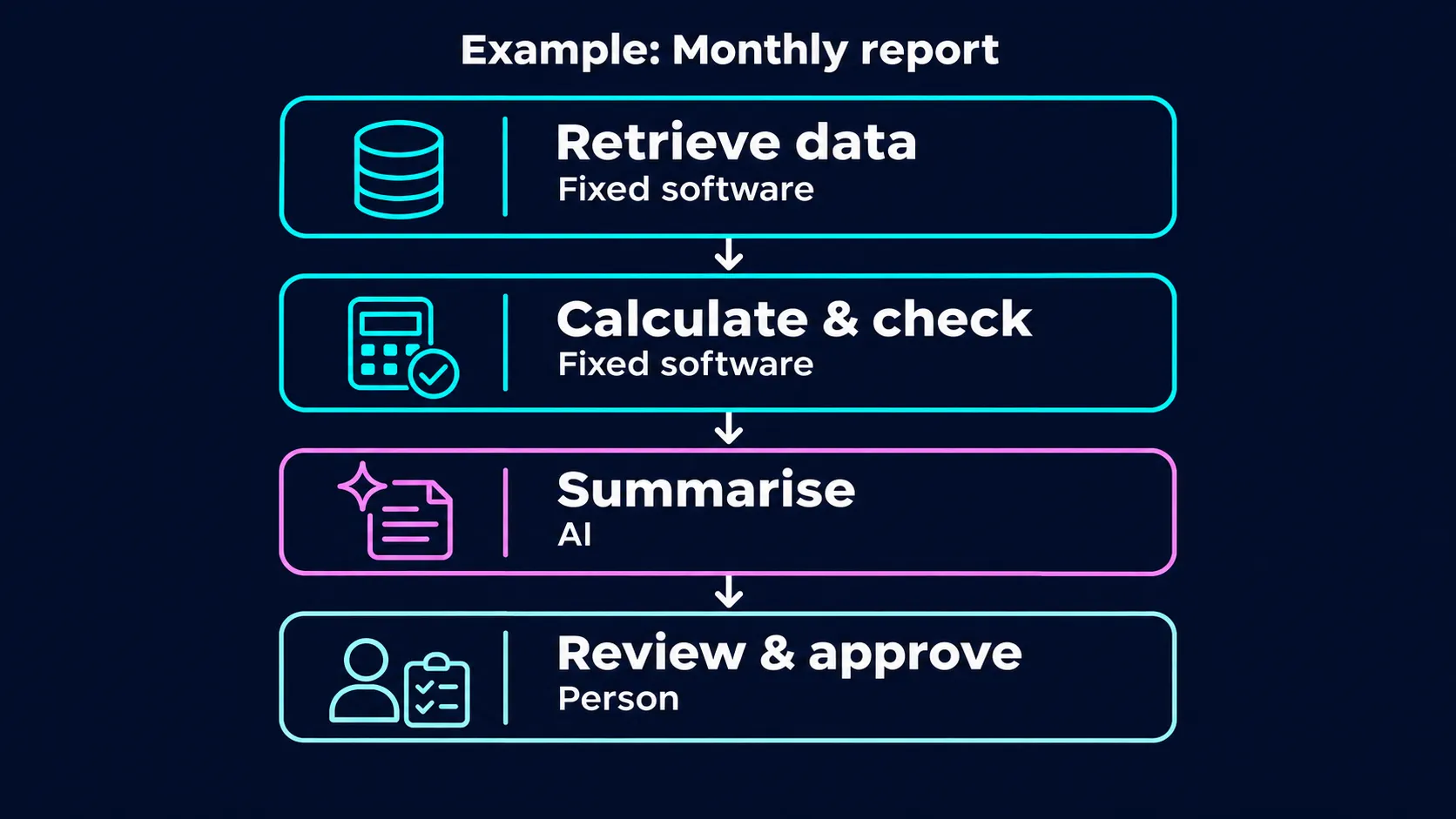
Hypothetical monthly report: fixed software processes the figures and AI drafts the summary. In this example, a person reviews it before approval.
With the right tools, anyone can become a workflow builder
People who work with a process every day are often best placed to spot opportunities for automation. With AI, anyone in the business can potentially become a workflow builder: contributing ideas, describing the steps and working with an agent to turn them into a process.
People need access to the right tools and an understanding of how to use them. IT works with them to establish the foundation: approved data sources, suitable functions and clear guardrails. Employees can then build on that foundation and improve their own processes within those boundaries.
IT should therefore discuss which tools suit which tasks with the people using them. That includes deciding when a workflow first explored with an agent should become a fixed script or a small application. The best approach may change as the rules become clearer and the task is repeated more frequently.
Within the provided setup, the business user might refine instructions or change how a result is presented. For the hypothetical report, they could add another level of headings or compare already approved metrics, where the configured tools and rules allow it. A new data source, action or broader permissions brings IT back into the process. Changes that affect the business meaning of the workflow are reviewed together.
The guardrails leave room for people to make improvements. They also make it clear who maintains the technical setup and how it can be extended.
Start with one specific process
Choose a recurring task you know well and whose result you can check. Describe its goal, data sources, rules and exceptions. Discuss with IT or a development partner what the workflow may do independently and where checks are needed.
Decide together which steps an agent should handle and which are better implemented as conventional software. Test the solution with suitable examples and failure cases before extending it to more tasks.
At pargoo, we combine an understanding of your processes with technical implementation. Working with the people who use them every day, we develop tools and appropriate guardrails so they can automate and improve their workflows.